
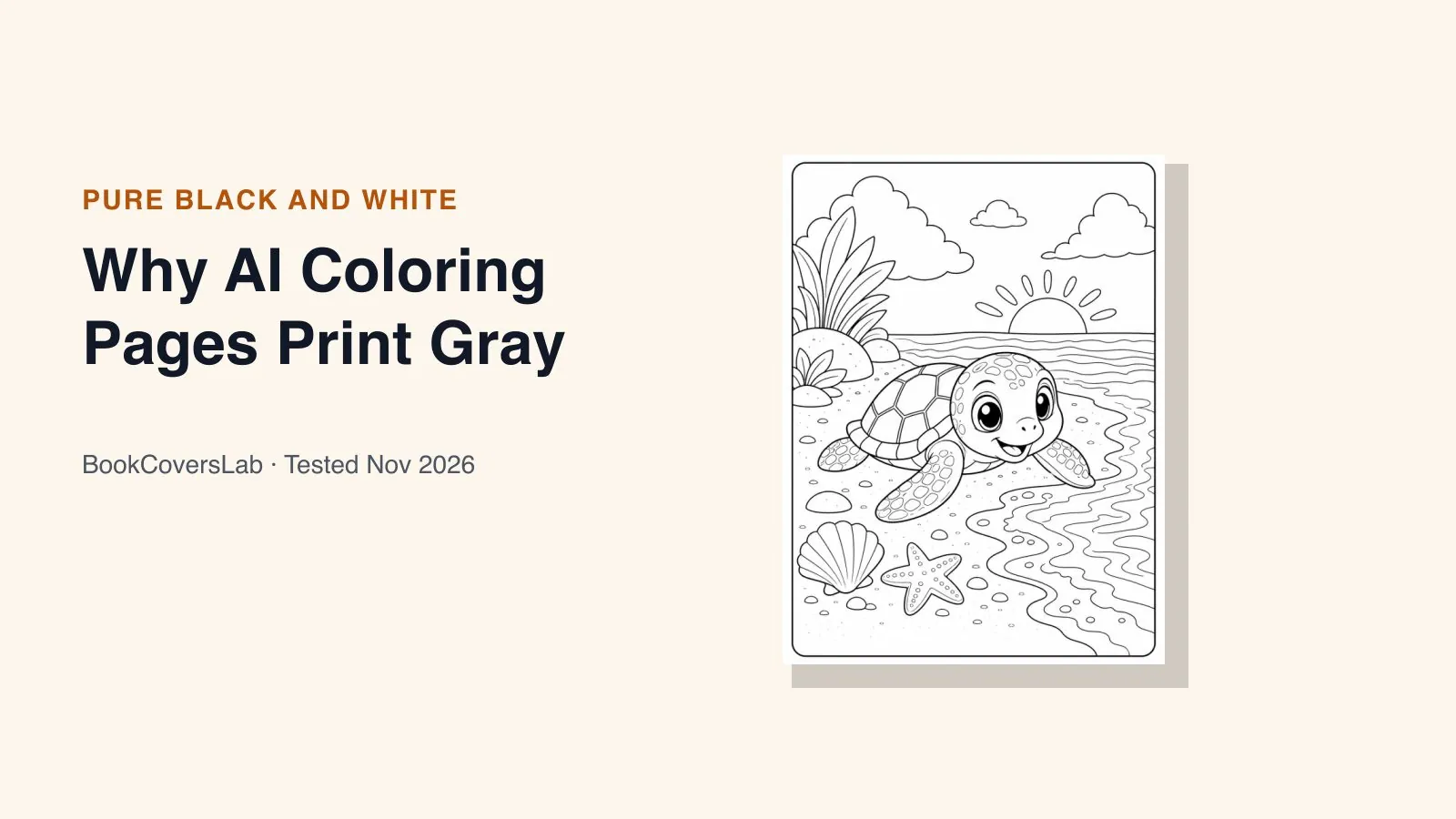
Why AI Coloring Pages Print Gray, and How to Make Them Pure Black and White
AI coloring pages print gray because they are not really black and white. In our test of four AI pages (Nov 27, 2026), 4.8% to 14.5% of the pixels were gray and every page used 220 different gray levels. A black-ink printer can only print gray as a pattern of tiny dots, so those pixels become fuzzy edges and a dirty cast. The fix is to convert each page to two values only, black and white, before you export.
This guide shows what the gray looks like, how it prints, and three ways to remove it. If your pages also have broken lines or specks, our guide to cleaning up AI coloring pages covers those repairs. Pages from the AI Coloring Book Generator are converted to black and white on export, so this matters most for art from other AI tools.
Key Takeaways
- "Black and white" AI art is usually grayscale: 220 gray levels on each of our four test pages.
- A black-ink printer turns gray into a dot pattern. Gray line edges print fuzzy; gray backgrounds print as a dirty tint.
- Grayscale is not the fix. A threshold that leaves exactly two values is.
- After cleanup our test pages had 0% gray pixels and their ink coverage rose from 7.7–10.3% to 11.6–16.4%, because soft edges became solid line.
How much gray is in an AI coloring page?
More than it looks. We took four pages from our own sample books (600 x 800 px previews, made with an AI image model), measured every pixel, then ran the formatter's Auto Repair with the low-resolution preset:
| Page | Gray pixels before | Gray levels before | Gray pixels after | Levels after | Ink coverage before → after |
|---|---|---|---|---|---|
| Sea turtle (kids) | 8.4% | 220 | 0% | 2 | 7.7% → 11.9% |
| Teapot (cozy) | 8.2% | 220 | 0% | 2 | 8.6% → 12.1% |
| Mandala (adult) | 14.5% | 220 | 0% | 2 | 10.3% → 16.4% |
| Fox (kids) | 4.8% | 220 | 0% | 2 | 9.6% → 11.6% |
Gray = pixel values 40–215 on a 0–255 scale. Ink = pixels darker than 128. Tested 2026-11-27 with the formatter's cleanup code (Remove More Gray 42, Keep More Detail 68, Thicken Lines 10).
Detailed pages carry the most gray. The mandala had three times the gray of the fox because every fine line has its own gray fringe.
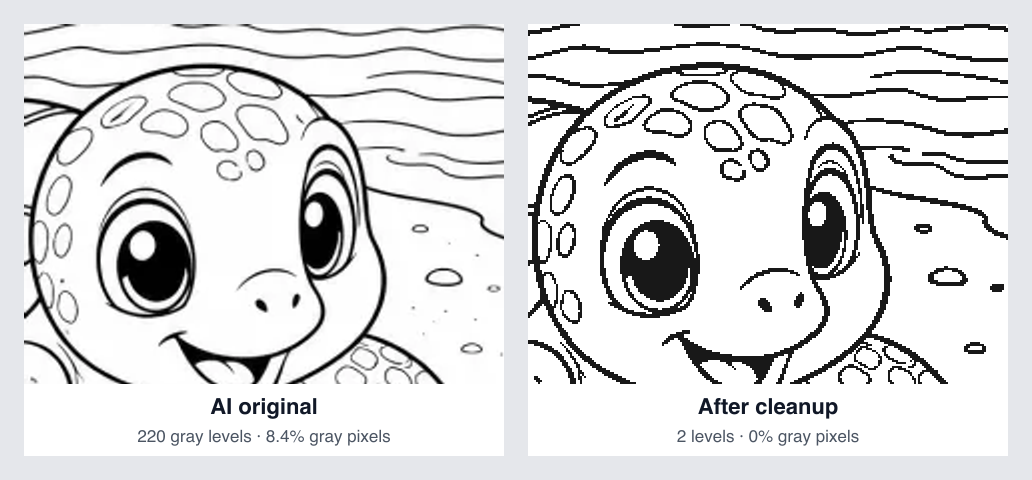
On screen, the original looks fine. Zoomed in, every line fades through gray into the paper.
Why does gray print badly in a black-ink coloring book?
Because a black-ink press has one ink. It cannot print "40% gray" as a lighter ink. It prints a pattern of black dots spaced so that, from a distance, the area looks gray. This is called halftoning.
On a photo that works. On a coloring page it means:
- line edges print as a ragged row of dots instead of a clean edge
- a faint gray background prints as a speckled tint across the whole page
- shading inside shapes prints as texture people have to color over
Here is a simulation of the same turtle printed with black ink only. The original's gray edges turn into dot patterns; the cleaned page prints as solid lines:
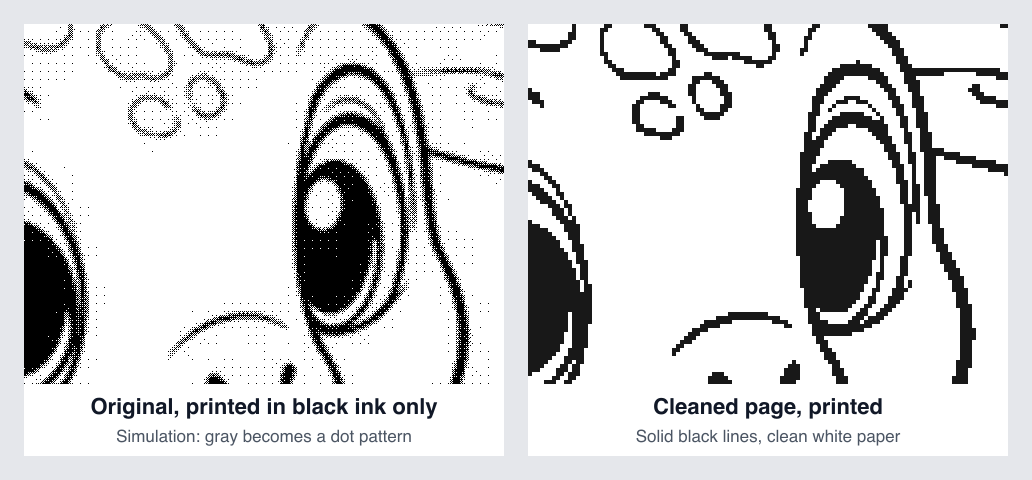
Simulation: the 600 x 800 px original upscaled 4x and rendered with an 8x8 ordered dither, which approximates how a one-ink printer reproduces gray. Real presses use finer screens, but the effect on soft line edges is the same.
KDP's own formatting help sets two related limits for black-and-white books (Fix paperback formatting issues): a minimum line weight of 0.75 pt (0.01 in), and at least a 10% fill for gray backgrounds. A faint AI background at 3–5% gray falls under that and may print unevenly or not at all.
Is grayscale the same as black and white?
No, and this trips up many first books. Grayscale keeps 256 shades of gray. Converting a color AI image to grayscale removes the color but keeps every gray fringe. A pure black-and-white (1-bit) page has exactly two values.
| Mode | Values per pixel | Good for |
|---|---|---|
| RGB color | 16.7 million | Covers, color interiors |
| Grayscale | 256 | Photos and shaded art in black-ink books |
| Black and white (bitmap) | 2 | Line art, coloring pages |
KDP accepts grayscale images in a black-ink book. The problem is how they print, not whether they upload.
How do you make a coloring page pure black and white?
Apply a threshold so each pixel becomes black or white. There are three practical ways.
1. Photoshop or GIMP threshold
- Photoshop: Image > Adjustments > Threshold. Drag the slider until lines are solid and the background is white. Start around 128 and move toward 160–190 for thin lines.
- GIMP: Colors > Threshold. Same idea.
This works well on clean art with an even white background. It struggles when the background has uneven gray (darker at the edges, lighter in the middle): one cut-off cannot fit both areas. You also repeat it page by page.
2. An adaptive threshold
An adaptive threshold compares each pixel with its own neighborhood instead of one global cut-off. A line on a slightly gray background still stands out from its surroundings, so it stays black while the background turns white.
The formatter's Auto Repair works this way. It also removes tiny black specks left by compression and can add line weight. Its three sliders:
| Slider | Effect | Move it when |
|---|---|---|
| Remove More Gray | How far a pixel must be below its surroundings to count as line | Raise it if haze remains; lower it if fine lines vanish |
| Keep More Detail | Protects small shapes from being treated as noise | Raise it for mandalas, hair and fur |
| Thicken Lines | Adds weight to every line | Raise it for kids' books (bold and easy pages) |
In the coloring book formatter, cleanup runs when you open the Make It Print-Ready step, and a drag-to-compare slider shows the original next to the cleaned page. Import, cleanup and a watermarked proof are free.
If you are still making the pages, the AI Coloring Book Generator runs the same cleanup on every page at export, so the gray never reaches the PDF.
3. Vectorize the page
Illustrator's Image Trace, Inkscape's Trace Bitmap or a vectorizer turns raster art into vector shapes, which are black and white by definition. This gives the cleanest edges at any size, but it can distort faces, hair and small details, and it takes longer per page.
What can go wrong when you remove the gray?
Three things, all visible at 100% zoom:
- Faint lines disappear in pieces. A stroke that was light gray falls below the cut-off and turns into a dashed line. In an earlier test one frame line broke into 16 dashes. Reconnect them by hand; see how to fix broken lines.
- Shading turns into black blobs. If the AI drew shading instead of line art, a threshold makes it solid black. Regenerate that page with "no shading, no gray" in the prompt.
- Lines get thicker. Soft edges become solid, so ink coverage rises. On our four pages it rose by 2 to 6 percentage points. That is usually good for coloring, but check small shapes such as eyes so they do not fill in.
What should you check before export?
| Check | Pass when |
|---|---|
| Gray pixels | The page shows only black and white at 100% zoom |
| Thin lines | Still continuous after conversion |
| Shading | No solid black areas that used to be soft shading |
| Line weight | At least 0.75 pt (0.01 in), about 3 px at 300 DPI |
| Resolution | 300 DPI at your trim size (pixel table) |
Then order a printed proof copy from KDP if you can. A screen cannot show you dot patterns; paper can.
FAQ
Why do my AI coloring pages print gray?
AI images are anti-aliased: every black line has a fringe of gray pixels, and many backgrounds carry a faint gray texture. In our test of four AI coloring pages, 4.8% to 14.5% of pixels were gray and each page used 220 different gray levels. A black-ink printer can only print gray as a pattern of tiny dots, so those pixels show up as fuzzy edges and a dirty cast.
Does KDP print coloring books in black and white?
A black-ink KDP paperback prints with black ink only. Shades of gray are reproduced as dot patterns. KDP's formatting help recommends at least a 10% fill for gray backgrounds and a minimum line weight of 0.75 pt for black-and-white books.
How do I make an image pure black and white?
Apply a threshold so each pixel becomes either black or white. In Photoshop use Image > Adjustments > Threshold; in GIMP use Colors > Threshold. Plain thresholds work on clean art, but an adaptive threshold handles uneven gray backgrounds better because it compares each pixel with its neighborhood.
Is grayscale the same as black and white for a coloring page?
No. Grayscale keeps 256 levels of gray. A coloring page should have only two values, black lines and white paper. Converting a color image to grayscale does not remove the gray haze; a threshold does.
Will making a page pure black and white break thin lines?
It can. Very faint or tapered strokes fall below the threshold and turn into dashes. Check thin lines after conversion and reconnect the gaps, or lower the gray-removal strength for detailed pages.
Related resources
- How to clean up AI coloring pages: specks, broken lines and the Reconnect tool
- Coloring book formatter: import pages, clean them and export a KDP interior PDF
- AI Coloring Book Generator: black-and-white pages from the start
- KDP image resolution for coloring books
- KDP coloring book requirements
Autor

Kategorie
Więcej wpisów
Najlepsze bezpłatne generatory okładek książek AI w 2026 r
Porównaj najlepsze bezpłatne generatory okładek książek AI dla autorów w 2026 r. Zobacz, które narzędzia są najlepsze pod względem pomysłów, dopasowania gatunkowego i przepływów pracy gotowych do KDP, w tym BookCoversLab.
7 Best Photo to Coloring Page Converters in 2026
Compare the best photo to coloring page converters in 2026 for printable line art, pet and family keepers, and the path into a KDP coloring book.
Can You Sell AI Coloring Books on Amazon? What KDP's Rules Actually Say
Yes, if you disclose AI images, own the rights and meet KDP's quality rules. KDP's exact wording, the 24-page minimum and the 2-titles-a-week limit.
Newsletter
Dołącz do społeczności
Zapisz się do naszego newslettera, aby otrzymywać najnowsze wiadomości i aktualizacje