

How to Make a Coloring Book for KDP with AI: A 2026 Step-by-Step Guide
Amazon KDP will not accept a folder of AI PNGs as a coloring book. It accepts a paperback interior PDF and a separate cover wrap. The paperback manuscript must be at least 24 pages, and Amazon asks for images at a minimum of 300 DPI (Paperback Submission Guidelines; Format Images in Your Book, retrieved 2026-09-09).
If you skip trim, blank backs, and DPI, you usually find out in Print Previewer, not in the generator. This guide is the production path: one idea, AI line-art pages, a print-ready interior, then a cover that matches the final page count.
If you are still choosing a niche, start with 9 Best KDP Niches for 2026 and the stacking worksheet in Low-Competition KDP Niches for 2026. If you are still comparing tools, start with Best AI Coloring Book Creator in 2026. This article is the how-to that comes after you decide to publish.
Key Takeaways
- A KDP coloring book is an interior PDF plus a cover wrap, not a zip of AI images.
- Lock trim size before you generate. 8.5 x 11 in is the default in BookCoversLab; 8.5 x 8.5, 8 x 10, and 6 x 9 are also available.
- Amazon’s paperback minimum is 24 pages. Count blank backs as real pages.
- Generate at print size, then check 300 DPI on export.
- Disclose AI-generated interior images in KDP even if you edited them later.
Quick answer: how do you make a coloring book for KDP with AI?
Lock theme, audience, and trim. Generate or import line-art pages. Add blank backs if markers matter. Check 300 DPI. Export one interior PDF. Build the wrap only after page count is stable. Tell KDP the images are AI-generated, then preview the upload.
Before you begin
By the end of this checklist you should know whether you are generating pages or only formatting pages you already have.
What you'll need:
- A theme sentence and an audience (ages 3-5 through Adults 18+)
- A KDP account
- Optional: finished PNG, JPG, or PDF coloring pages
- Time: about 1-3 hours for a short book once the theme is decided
- Difficulty: Beginner, if you treat this as a print job instead of a prompt chat
BookCoversLab's AI Coloring Book Generator can generate pages, insert blank backs, check 300 DPI, and export the interior. The first 3 prompt pages are editable without checkout. The generator does not build the paperback wrap. For that later step, use the Coloring Book Cover Maker.
KDP paperback files still have a 24-page minimum. The generator accepts 4-120 pages so you can draft a short set, but do not upload a 12-page interior expecting it to pass paperback setup (Paperback Submission Guidelines, retrieved 2026-09-09).
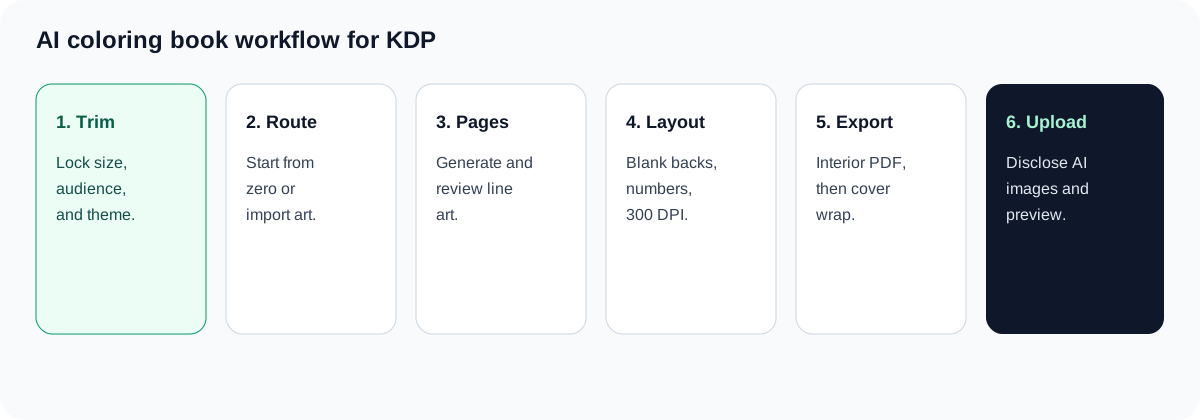
Step 1: Lock theme, audience, and trim size
By the end of this step, you will have one theme, one audience, and one trim size. Those three choices decide how the line art is composed.
Do this before you generate a full queue. If trim changes later, every page has to be regenerated or cropped.
- Write a theme you can repeat for 24 or more physical pages. "Cozy forest animals" is usable. "Cute stuff" is not.
- Pick an audience. Thicker outlines and more white space suit ages 3-5. Dense line work suits Adults 18+. For audience-specific advice, see the Coloring Book Maker for Kids or the Coloring Book Maker for Adults.
- Lock trim size before generation. In this generator the options are 8.5 x 11, 8.5 x 8.5, 8 x 10, and 6 x 9. The default book is 8.5 x 11 in, 12 pages, no-bleed, with a blank back after each artwork page.
- Decide bleed now. Amazon trims 0.125 in (3.2 mm) from the top, bottom, and outside edges. Artwork that must reach the cut needs bleed; artwork that should stay safely inside the page usually does not (Set Trim Size, Bleed, and Margins, retrieved 2026-09-09).
Verification: you can state trim, bleed, audience, and theme in one sentence. If any of those is still "maybe," stop.
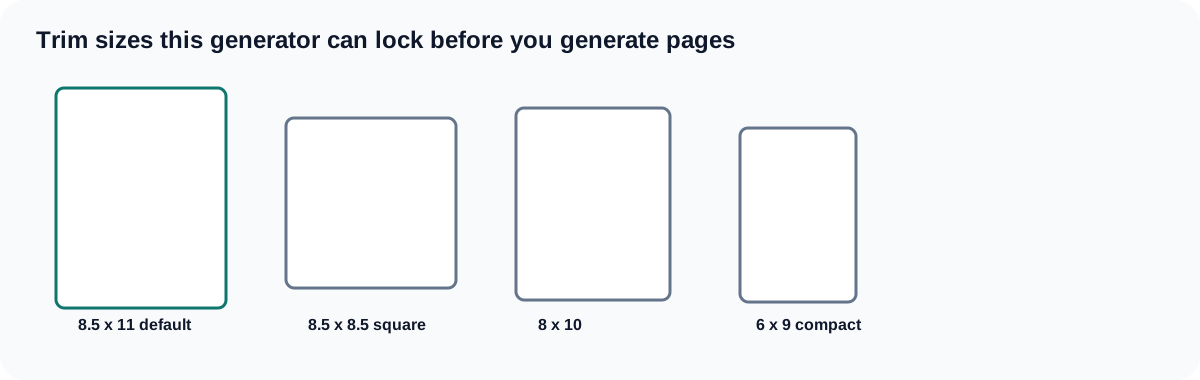
| Trim | Use when | Avoid when |
|---|---|---|
| 8.5 x 11 in | You want the largest coloring area; this is the generator default | You need a square thumbnail or a travel-size book |
| 8.5 x 8.5 in | The art is centered, square, or mandala-like | You force a tall scene into a square frame |
| 8 x 10 in | You want a slightly smaller portrait page | You mix it with 8.5 x 11 pages in the same PDF |
| 6 x 9 in | You want a compact book | Adult-detail pages need more room |
For bleed, gutters, and safe area after the pages exist, use Coloring Book Bleed and Margins for KDP instead of rewriting this step.
Step 2: Choose Start from zero or import finished art
By the end of this step, you will have picked the production route. The wrong route wastes the next hour.
- Start from zero if you still need prompts and AI line-art. That path is Setup → Prompt Queue → Art Review → Format pages.
- Import finished art if you already have PNG, JPG, or PDF coloring pages and only need layout, blank backs, and export.
Verification: if the line art already exists, do not generate more of it. Switch to AI Coloring Pages to KDP PDF when you only need trim, blank backs, and a PDF. If the book still needs pages, stay on the AI Coloring Book Generator.
This is the first moment the workbench is more useful than another ChatGPT tab. Open the generator, choose the route, and keep the trim from Step 1.
Step 3: Generate and review AI line-art pages
By the end of this step, you will have an ordered set of pages you are willing to print, not a pile of "maybe" previews.
The generator uses GPT Image 2 for coloring pages. 8.5 x 11 pages generate at 2512 x 3264 pixels. Other trims use matching generation sizes.
- Fill title, theme, and an avoid list (no text in the illustration, no photorealistic shading, no tiny filler that will clog at print size).
- Use a print-specific prompt, not a generic "cute coloring page" line. Example:
Clean black line art of a sleeping fox in a mossy den, thick outlines for ages 6-8, large white spaces to color, no text, no gray shading, white background.To try one prompt as a single page first, use the AI Coloring Page Generator. - Edit the first 3 prompt pages without checkout. Remaining prompts stay locked until coloring-book creator access is unlocked.
- Generate previews. Approve, regenerate, or reorder in Art Review.
- If the plan includes the light editor, use Erase for stray marks and Reconnect for broken outlines. Starter does not include that editor. Growth and Pro do.
Verification: open the page at roughly print size. If a line disappears, or gray mush sits where a clean outline should be, regenerate or repair before formatting.
A chat assistant can write prompts. It does not lock trim, insert blank backs, or export the interior PDF. If you want the comparison of page generators versus a publishing workflow, that is the job of AI Coloring Pages for KDP vs Print-Ready Coloring Books.
Step 4: Add blank backs, page numbers, and 300 DPI checks
By the end of this step, the physical page order should match the book you intend to sell.
Amazon does not require a blank reverse on coloring books. Many publishers still add one when markers are likely, because ink can show through. That choice doubles the physical page count: 30 art pages with blank backs become 60 interior pages.
- Choose page sides: artwork every page, artwork plus a white blank back, or artwork plus a black separator.
- Recalculate page count. KDP still needs 24 pages minimum. If blank backs drop you under 24, add pages or keep more art.
- Set page numbers to none, arabic, or roman. Numbers run across art, blank, and black pages.
- Confirm DPI. Amazon's image help says to insert images at 100% size and a minimum of 300 DPI, and not to enlarge them after placement (Format Images in Your Book, retrieved 2026-09-09). The generator targets 300 DPI for the selected trim and still measures effective DPI on export. Pages below that threshold can be upscaled and may add HD credits, plus one coloring-export credit for the PDF.
For 24-150 pages, Amazon's inside (gutter) margin is 0.375 in (9.6 mm). Outside margins are at least 0.25 in without bleed and 0.375 in with bleed (Set Trim Size, Bleed, and Margins, retrieved 2026-09-09).
Verification: you can say the physical page count out loud, and it includes blank or black pages. If that number is still changing, do not build the cover.
When the question is only "should this book be single-sided," read Do Coloring Books Need Blank Backs?.
Step 5: Export the interior PDF
By the end of this step, you have one interior file, not a folder of images.
The formatter workbench applies gutter, safe zone, paper white, page order, and preflight for trim, bleed, DPI, and continuous page numbers. The download is a KDP interior PDF.
- Run the checks. Fix trim mismatches, broken page numbers, and low-DPI pages before you pay for another round of art.
- Export. Keep the page count that the PDF actually contains.
- Open the PDF at 100% and flip through blank backs. Confirm nothing important sits in the trim.
Verification: the PDF page size matches the trim you selected (plus bleed if bleed is on). Amazon calculates page count from the manuscript and rounds up to an even number if needed, so a 25-page file becomes 26 pages (Paperback Submission Guidelines, retrieved 2026-09-09).
If the pages already existed and you only needed this step, the longer interior walkthrough is How to Format a Coloring Book for KDP.
Step 6: Build the cover wrap after page count is locked
By the end of this step, the wrap uses the final interior page count.
Spine width depends on page count and paper. If you design the cover on a 40-page guess and then add blank backs, the spine is wrong.
Amazon requires a single cover PDF that includes back, spine, and front. Spine text needs at least 79 pages; shorter books should not put text on the spine (Create a Paperback Cover, retrieved 2026-09-09). Cover images also need 0.125 in bleed past the trim and at least 300 DPI.
- Take the exported page count to the Coloring Book Cover Maker or the KDP Cover Creator.
- Confirm spine width with the KDP Cover Size Calculator.
- Keep live text inside the cover safe zone, then run KDP Cover Preflight.
Verification: interior page count on KDP, spine width in the calculator, and the wrap file all agree.
Step 7: Disclose AI-generated images and upload to KDP
By the end of this step, the book is in Print Previewer with an honest AI disclosure.
Amazon requires you to inform KDP of AI-generated text, images, or translations when you publish or republish. AI-generated images include cover and interior artwork, even after substantial edits. If you created the art yourself and only used AI to brainstorm or clean it, that is AI-assisted and does not need the same disclosure (Content Guidelines, retrieved 2026-09-09). Line art from an image model is AI-generated.
- Create the paperback title. Choose interior type and paper. Black line art usually prints as black ink on white paper; use color ink only if the interior actually contains color.
- Upload the interior PDF and the wrap.
- Answer the AI-generated content questions truthfully.
- Walk Print Previewer for low resolution, text outside the safe zone, and blank-page surprises.
Verification: Print Previewer shows the trim you locked in Step 1, and the AI disclosure matches how the pages were made. Preflight does not guarantee approval. Amazon still reviews content, quality, metadata, and disclosure.
If Previewer flags the coloring interior, use Fix KDP Print Previewer Errors for Coloring Books.
Common mistakes to avoid
Generating pages before trim is locked. The composition is built for a page size. Changing 8.5 x 11 to 8.5 x 8.5 later crops the art.
Uploading under 24 pages. A 12-page draft can exist in the generator. It is not a KDP paperback.
Treating screen sharpness as 300 DPI. Amazon's image guide says not to enlarge images after you place them, and to keep a 300 DPI minimum (Format Images in Your Book, retrieved 2026-09-09).
Building the wrap before blank backs. Blank backs change page count and spine width.
Skipping AI disclosure because you "cleaned up" the lines. Amazon still counts AI-created images as AI-generated after edits (Content Guidelines, retrieved 2026-09-09).
What success looks like
You should have:
- One interior PDF at a single trim, 24 pages or more
- Blank or black pages in a deliberate order
- DPI checks against a 300 target
- A wrap whose spine matches that page count
- An AI-generated-image disclosure that matches the workflow
Next, make listing images with the Book Mockup Generator only after the files preview cleanly.
Frequently Asked Questions
Can I make a coloring book for KDP with AI?
Yes. AI can generate coloring line art, but KDP still needs a print-ready interior PDF, a locked trim, at least 24 paperback pages, and 300 DPI images. Disclose AI-generated images when you publish.
What trim size should I use for a KDP coloring book?
Use 8.5 x 11 in when you want the most coloring area. Use 8.5 x 8.5 in for square layouts. 8 x 10 and 6 x 9 are smaller. Lock one size before generation.
Do KDP coloring books need blank backs?
No. Amazon does not require them. Add them when markers are likely. Recount physical pages before you build the cover. See Do Coloring Books Need Blank Backs?.
Are AI coloring pages automatically 300 DPI?
No. Amazon asks for a 300 DPI minimum. This generator targets 300 DPI for the selected trim and still checks effective DPI on export.
Do I have to tell KDP the pages are AI-generated?
Yes, if an AI tool created the images. Edits do not change that. Prompt-only brainstorming without AI artwork is AI-assisted and does not need the same disclosure (Content Guidelines, retrieved 2026-09-09).
Related Resources
AI Coloring Book Generator
Generate AI pages, add blank backs, check 300 DPI, and export a print-ready interior PDF.
Open the coloring book generator
Best AI Coloring Book Creator in 2026
Compare tools by whether they help you publish a KDP book, not only generate pages.
Read the 2026 comparison
AI Coloring Pages to KDP PDF
Import finished PNG, JPG, or PDF pages when you only need layout and export.
Format finished coloring pages
How to Format a Coloring Book for KDP
Go deeper on trim, blank backs, and interior PDF discipline after the pages exist.
Read the formatting guide
Coloring Book Cover Maker
Build the matching wrap after the interior page count is locked.
Build the coloring book cover
Coloring Book Workflow Hub
See generator, formatting, cover, and troubleshooting steps in one cluster.
Browse the coloring workflow hub
Conclusion
You now have a KDP coloring book path that starts with trim and ends with an interior PDF, a matching wrap, and an AI disclosure.
- Start in the AI Coloring Book Generator when you still need pages.
- Move to AI Coloring Pages to KDP PDF when the art already exists.
- Finish the wrap only after page count is stable, then preview the upload.
A prompt is a start. The book is the PDF that survives Print Previewer.
Autor

Kategorie
Więcej wpisów
Najlepszy generator książek do kolorowania AI 2026: które narzędzia naprawdę pomagają opublikować w KDP?
Porównaj najlepszy generator książek do kolorowania AI 2026. Zobacz, które kończą na PNG, a które dają PDF wnętrza KDP gotowy do druku.
Najlepsza alternatywa dla KDP Cover Creator do okładek gotowych do druku
Przestań męczyć się z obliczeniami kręgosłupa i ustawieniami spadów. Dowiedz się, jak używać BookCoversLab do generowania okładek zgodnych z KDP w rozdzielczości 300 DPI w zaledwie 6 krokach.
AI coloring pages dla KDP vs print-ready coloring books: co najczesciej umyka twórcom
AI coloring pages to nie to samo co print-ready coloring book dla KDP. Zrozum roznice miedzy generowaniem stron a gotowym do publikacji pakietem.
Newsletter
Dołącz do społeczności
Zapisz się do naszego newslettera, aby otrzymywać najnowsze wiadomości i aktualizacje