
KDP Image Resolution for Coloring Books: 300 DPI Pixel Sizes and How to Fix Low-Res Pages
KDP asks for 300 DPI. For an 8.5 x 11 inch coloring page with bleed, that means 2588 x 3375 pixels. Most AI images are far smaller: a 1024 x 1536 image fills that page at about 119 DPI, and even a Midjourney upscale reaches only about 208 DPI. To fix a low-resolution page, export the art larger, choose a smaller trim, or upscale it, then check every page again before upload.
This is the image part of KDP's previewer errors. For the full list of what KDP flags, see fix KDP print previewer errors for coloring books. If you are starting from scratch, the AI Coloring Book Generator generates each page close to print size and enhances it to 300 DPI on export.
Key Takeaways
- KDP: "Minimum resolution of 300 DPI," and do not enlarge images after you place them (Submission Guidelines).
- Effective DPI = pixels ÷ inches on the page. Changing the DPI number in an image editor does nothing.
- 8.5 x 11 with bleed needs 2588 x 3375 px. 6 x 9 with bleed needs 1838 x 2775 px.
- Common AI sizes land at 91–221 DPI on large trims. Plan an upscale step.
What resolution does KDP require for coloring books?
300 DPI. KDP's Paperback Submission Guidelines say "Minimum resolution of 300 DPI" and recommend a maximum of 600 DPI. KDP's formatting help adds that you should insert images at their original size and not enlarge them, because enlarging lowers the resolution.
A coloring page is one large image per page, so the whole page has to meet this. That is why coloring books hit resolution warnings more often than novels.
How many pixels does each KDP trim size need at 300 DPI?
Multiply the page size in inches by 300. With bleed, KDP adds 0.125 inch to the width and 0.25 inch to the height (trim, bleed and margins).
| Trim | Page with bleed | Pixels for full-bleed art | Art area without bleed* | Pixels for that area |
|---|---|---|---|---|
| 8.5 x 11 in | 8.625 x 11.25 in | 2588 x 3375 | 7.5 x 10 in | 2250 x 3000 |
| 8.5 x 8.5 in | 8.625 x 8.75 in | 2588 x 2625 | 7.5 x 7.75 in | 2250 x 2325 |
| 8 x 10 in | 8.125 x 10.25 in | 2438 x 3075 | 7 x 9 in | 2100 x 2700 |
| 6 x 9 in | 6.125 x 9.25 in | 1838 x 2775 | 5.125 x 8.25 in | 1538 x 2475 |
*Art area = trim minus the margins our formatter uses for books under 80 pages: 0.5 in inside, 0.375–0.5 in outside, top and bottom. KDP's own minimums are smaller (0.375 in inside for 24–150 pages, 0.25 in elsewhere without bleed), so your art area can be slightly larger.
Full-bleed art covers the whole sheet, so it needs the most pixels. Art inside the margins needs about 20–25% fewer.
What DPI do common AI image sizes reach?
We calculated the effective DPI when each image fills the page with bleed (the image is scaled to cover the sheet; the shorter side decides the DPI):
| Image size (px) | Where it comes from | 8.5 x 11 | 8.5 x 8.5 | 8 x 10 | 6 x 9 |
|---|---|---|---|---|---|
| 1024 x 1024 | Many AI tools, square | 91 | 117 | 100 | 111 |
| 1024 x 1536 | AI tools, portrait | 119 | 119 | 126 | 166 |
| 896 x 1344 | Midjourney 2:3, before upscale | 104 | 104 | 110 | 145 |
| 1792 x 2688 | Midjourney 2:3, upscaled | 208 | 208 | 221 | 291 |
| 2048 x 2048 | Large square output | 182 | 234 | 200 | 221 |
| 2512 x 3264 | BookCoversLab generator, 8.5 x 11 | 290 | — | — | — |
Calculated 2026-11-27. Midjourney sizes from its upscaler docs.
Two things stand out. First, nothing below about 2,500 px on the long side reaches 300 DPI on a large trim. Second, the 6 x 9 trim is forgiving: a Midjourney upscale is 291 DPI there, almost enough.
Our own generator makes 8.5 x 11 pages at 2512 x 3264 px, which is 290 DPI on the bleed sheet. Export enhances each AI page to 300 DPI, and that repair is included for pages you generate. If you have not made the pages yet, starting in the AI Coloring Book Generator avoids the upscaling step entirely.
Why doesn't changing the DPI setting fix it?
Because DPI is only a label until the image is placed on a page. A 1024 x 1536 image labelled "300 DPI" in Photoshop would print at 3.4 x 5.1 inches. Stretch it to fill 8.625 x 11.25 inches and each inch has only about 119 pixels, whatever the label says.
KDP measures the placed image, so the only fixes are more pixels or fewer inches.
How do you fix a low-resolution coloring page?
Four options, from best to last resort:
| Fix | What it does | Trade-off |
|---|---|---|
| Re-export larger | Generate or upscale inside the AI tool at its highest setting | Best quality; not every tool goes high enough |
| Choose a smaller trim | 6 x 9 needs about 40% fewer pixels than 8.5 x 11 | Smaller pages, less room to color |
| Upscale the page | AI upscaler adds pixels and sharpens edges | Can soften fine detail; clean up afterwards |
| Replace the page | Regenerate at a larger size | Takes time, changes the design |
For upscaling, use a tool built for line art or illustrations, not one tuned for photos, and upscale before you convert the page to pure black and white. A photo upscaler can invent texture in white areas, which then prints as specks. After upscaling, run the page through a black-and-white cleanup (how to remove gray).
In the coloring book formatter, pages below 300 DPI are flagged as soon as you import them:
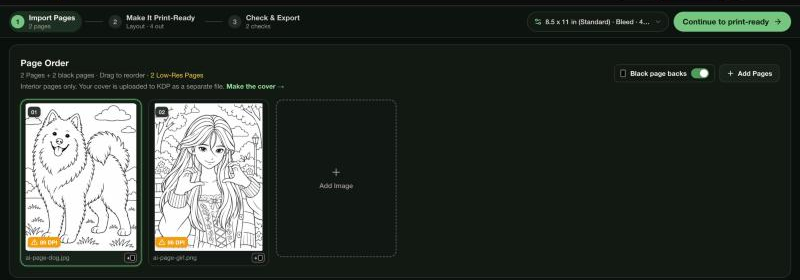
From there, One-Tap HD (300 DPI) upscales one page using one HD credit, and the pre-export check lists every page that is still low before you pay for the final file. HD repair upscales up to 4x; a page that is still under 300 DPI after that is listed as one to replace. HD repair is part of the paid plans; import, detection and the watermarked proof are free.
Will KDP reject a coloring book with low-resolution images?
Not always. KDP's previewer shows image resolution warnings, and you can choose to continue. But a low-resolution page prints soft or jagged, and that shows up in reviews long after the upload. Treat the warning as a print-quality problem, not a box to click past.
Check the low-resolution warning page by page. If only the title page or a decorative frame is low, fixing those is quick. If every design is at 120 DPI, the art itself needs work.
FAQ
What resolution does KDP require for coloring book images?
KDP's Paperback Submission Guidelines list a minimum resolution of 300 DPI and recommend no more than 600 DPI. KDP's formatting help says to insert images at their original size and not enlarge them, because enlarging lowers the resolution.
How many pixels is an 8.5 x 11 coloring page at 300 DPI?
With bleed, the page is 8.625 x 11.25 inches, so a full-bleed image needs 2588 x 3375 pixels. Without bleed, art that sits inside 0.5 inch margins (7.5 x 10 inches) needs 2250 x 3000 pixels.
Are AI images high enough resolution for KDP?
Usually not at full page size. A 1024 x 1536 image is about 119 DPI on an 8.5 x 11 page with bleed, and a Midjourney upscale at 1792 x 2688 is about 208 DPI. Both need upscaling or a smaller trim to reach 300 DPI.
Can I just change the DPI setting in Photoshop to 300?
No. Changing the DPI number without adding pixels only changes how large the image would print. KDP measures the pixels placed on the page, so a 1024 px image stretched across 8.5 inches is still about 120 DPI.
Does upscaling fix low resolution for KDP?
It adds pixels, so the effective DPI goes up and KDP stops flagging the page. An AI upscaler designed for line art keeps edges sharper than plain resizing. Clean the page to pure black and white afterwards so any soft edges from upscaling do not print as gray.
Related resources
- Fix KDP print previewer errors for coloring books: every previewer error in one list
- Coloring book formatter: DPI check on import, HD repair and KDP interior export
- AI Coloring Book Generator: pages generated near print size
- Midjourney coloring book to KDP PDF: pixel sizes for Midjourney
- KDP trim sizes
Autor

Categorías
Más entradas
Análisis profundo de los elementos de diseño de portada de KDP: Deconstrucción del lenguaje visual de los más vendidos
Esta inmersión profunda deconstruye el diseño de portada del bestseller de KDP en cuatro pilares centrales: tipografía, color, imágenes y composición, y explica cómo cada elemento le indica psicológicamente al lector objetivo en tres segundos. El artículo destaca BookCoversLab como un atajo, que combina la generación de imágenes de IA integrada con plantillas de best-sellers de un clic para obtener portadas profesionales probadas en el mercado.
Coloring Book Bleed and Margins for KDP: What Actually Matters
Learn how bleed and margins work for KDP coloring books. Decide when full bleed makes sense, how much safe space line art needs, and how to avoid cramped or risky interior pages.
Cómo hacer una portada de libro KDP con BookCoversLab
Este artículo presenta BookCoversLab, que agiliza la creación de portadas de KDP con una calculadora de portadas precisa, inspiración generada por IA y estilo de "bestseller" con un solo clic. Crea automáticamente plantillas completas con sangrado y lomo dinámico, aplica comprobaciones previas de 300 ppp y exporta archivos PDF listos para imprimir, lo que ayuda a los autores independientes a lograr portadas compatibles y listas para el mercado rápidamente y pasar la revisión de KDP en el primer intento.
Newsletter
Únete a la comunidad
Suscríbete a nuestro newsletter para recibir las últimas novedades y actualizaciones