
Page Numbers in a Coloring Book: Do You Need Them and How to Add Them for KDP
No, a coloring book does not need page numbers. KDP does not require them. If you add them, KDP's Paperback Submission Guidelines ask for all page numbers to be in sequential order, and gaps can fail review. The safe setup: count every physical page, including blank and black backs, print numbers at the bottom inside the margins, and leave them off fully black pages.
Page numbers matter more in a coloring book than they seem, because single-sided books double the page count with blank backs. A sequence that skips the backs looks like a gap. This guide covers when to use numbers, where to put them and how each page type counts. In the coloring book formatter and the AI Coloring Book Generator, numbers are one setting: none, 1-2-3 or I-II-III, continuous across every page.
Key Takeaways
- Page numbers are optional on KDP. If used, they must be sequential with no gaps.
- Count every physical page: title, copyright, designs, blank backs, black backs.
- Print numbers at the bottom center or outside corner, inside the margins.
- On fully black pages, count but do not print the number (a blind folio).
Should coloring books have page numbers?
It depends on the book. Reasons to add them and reasons to skip:
| Add page numbers when | Skip them when |
|---|---|
| Adult books with 40+ designs | Toddler books with 20–30 simple pages |
| Buyers share favorite pages ("page 23 is my favorite") | Designs run to the edge (full bleed) and a number would sit on the art |
| Activity books with answers or instructions | You want every page to look like a clean art print |
| You want the book to feel like a finished, published book | The book is short and a number adds nothing |
Neither choice affects whether KDP accepts the book. Inconsistent numbering does.
What are KDP's rules for page numbers?
From KDP's Paperback Submission Guidelines, read on Nov 27, 2026:
| Rule | Meaning for a coloring book |
|---|---|
| Page numbers are not required | You can leave every page unnumbered |
| If used, order all page numbers sequentially | 1, 2, 3, 4… with no jumps |
| Roman numerals are allowed for front matter | i, ii, iii on front pages, then 1, 2, 3 is valid |
| Gaps can trigger a review failure | Skipping the numbers of blank backs creates a gap |
The gap problem is the one coloring books hit. If design pages read 1, 3, 5, 7 because the backs were left out of the count, the printed book has numbers that jump. Count every page and the problem disappears.
How do blank and black pages count?
Every physical page counts. What changes is whether the number is printed on it:
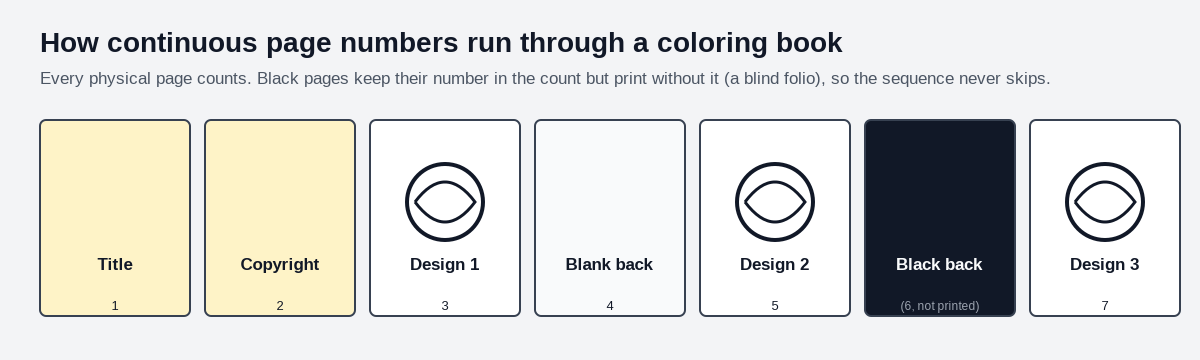
| Page type | Counts in sequence | Number printed? |
|---|---|---|
| Title, copyright, belongs-to, intro | Yes | Usually yes (or roman numerals) |
| Design page | Yes | Yes, if you use numbers |
| Blank back | Yes | Optional; printing it shows the sequence is continuous |
| Black back | Yes | No: a white number on black looks like a mistake |
Not printing the number on a page while still counting it is called a blind folio. It is standard in book design for full-page images and section openers.
In our formatter, numbering is physical and continuous: every page gets the next number. Black pages count toward the sequence but print without a number or footer. Blank backs carry their number like any other page.
Where should page numbers go on a coloring page?
Bottom center or the bottom outside corner, inside the margins. Avoid the inside edge: it curves into the binding.
| Position | Works for | Watch out for |
|---|---|---|
| Bottom center | Most books, simplest | Art that reaches the bottom margin |
| Bottom outside corner | Classic book look; easy to find when flipping | Must swap sides on left and right pages |
| Top corners | Rare in coloring books | Competes with the design |
Keep the number inside KDP's minimum margins: 0.375 in from the trim with bleed, 0.25 in without (trim, bleed and margins). Leave clear space between the number and the art so nobody colors over it. A small sans-serif at 9–11 pt is enough; KDP's minimum font size is 7 pt.
Arabic or roman numerals?
1, 2, 3 for almost every coloring book. Roman numerals (I, II, III) look classic on a short adult book but get long fast (page 88 is LXXXVIII).
If you like the traditional approach, use roman numerals on the front matter and start arabic numerals at the first design. KDP allows that, as long as each sequence runs in order. Most coloring publishers keep one style throughout because it is simpler to check.
How do you add page numbers to a coloring book?
In Word, Affinity Publisher or InDesign: insert a page number field in the footer of a master page, apply it to every page, then set black-back pages to a master without numbers. Export one PDF.
In Canva: use Canva's page number option if your editor shows it, or add numbers as text boxes. Either way, make sure blank backs exist as real pages in the design so they are counted. Hand-typed numbers are where gaps and duplicates creep in, so check the proof page by page. More in how to make a coloring book in Canva for KDP.
In the coloring book formatter or the AI Coloring Book Generator: choose No page numbers, Arabic numbers (1, 2, 3) or Roman numerals (I, II, III) at export. You can set position (left, center, right), size, color and offset, and add a footer line such as your brand name. Numbers renumber automatically when you insert, delete or reorder pages, including blank and black backs.
What does a correct sequence look like?
For a single-sided book with four front pages:
| Physical page | Content | Printed number |
|---|---|---|
| 1 | Title page | 1 (or none) |
| 2 | Copyright | 2 |
| 3 | This book belongs to | 3 |
| 4 | Intro | 4 |
| 5 | Design 1 | 5 |
| 6 | Blank back | 6 |
| 7 | Design 2 | 7 |
| 8 | Black back | (counted, not printed) |
| 9 | Design 3 | 9 |
The design on page 9 is the third design, not "page 3". That is normal and matches how KDP and printers count.
FAQ
Do coloring books need page numbers?
No. KDP does not require page numbers in a paperback. Many coloring books skip them. They are useful when buyers share or discuss specific pages, in activity books with answer pages, and in long adult books.
What are KDP's rules for page numbers?
If you use page numbers, KDP's Paperback Submission Guidelines ask for all page numbers to be in sequential order. Roman numerals for front matter are allowed. Gaps or out-of-order numbers can fail review.
Do blank pages get page numbers in a coloring book?
Blank pages count in the sequence. Whether you print the number on them is a style choice. The common rule is to count every page, print numbers on design pages, and leave numbers off fully black pages (a blind folio).
Where should page numbers go on a coloring page?
At the bottom center or bottom outside corner, inside the margins. Keep them clear of the artwork and away from the inside edge, which curves into the binding.
Should the first design be page 1?
Not necessarily. In most printed books page 1 is the first physical page, the title page. Numbering the front matter keeps the count matching the physical book and avoids gaps, which is the safest choice on KDP.
Related resources
- Coloring book title and copyright pages: front matter and page order
- Coloring book formatter: page numbers, blank and black backs, KDP interior export
- AI Coloring Book Generator
- KDP coloring book requirements
- Do coloring books need blank backs?
Autor

Categorias
Mais posts
AI coloring pages para KDP vs coloring books print-ready: o que a maioria dos criadores ignora
AI coloring pages nao sao a mesma coisa que um coloring book pronto para KDP. Entenda a diferenca entre gerar paginas e entregar um pacote editorial realmente pronto.

7 Best AI Coloring Page Generators in 2026 (Printable PNG First)
Compare the best AI coloring page generators in 2026 for printable line-art PNGs, KDP trim sizes, and the handoff into a full coloring book workflow.
Coloring Book Title Page, Copyright Page and Other Front Pages: What to Include and in What Order
What goes on a coloring book title page and copyright page, plus belongs-to, intro and black pages. Copy-ready templates and page order.
Newsletter
Junte-se à comunidade
Assine nossa newsletter para receber as últimas novidades e atualizações